














Play an online poker tournament |
If you are looking to play in an online poker tournament you need download the software from the selected poker room. This is a small guide to how you download a poker room and register so you are able to play in online poker tournaments.
In this example we demonstrate how you download and register at Party Poker – the world’s largest online poker room. Party Poker always has a wide selection of different online poker tournaments.
First of all you select an online poker tournament from any of our tournament lists. When you have located a tournament that suits your needs you click on the tournament and is taken straight to the poker room’s download section.
From the poker room’s website you need to download their software application. All you have to do is to press the download button. It is usually well marked as seen here on the Party Poker screenshot.

Save the Party Poker installation client on your desktop and run the client when the download is complete.
When the client is installed on your computer you need to sign-up and register as a player. Fill out the sign-up form below and you are set to go.
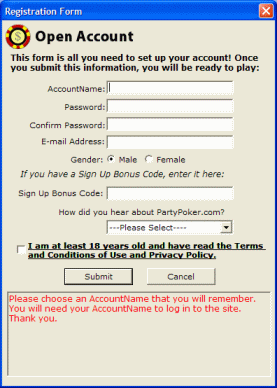
At some poker rooms you can enter a bonus code. A bonus code gives you a specific bonus on your first deposit. When you use a link from TournamentMonitor.com you are always given a bonus on first deposit, but a few rooms you have a choice. At party poker you can choose between these codes:
'MONITOR25' - $25 bonus on first deposit
'MONITOR150' – 30% bonus up to 150$ on first deposit
When registered, you can find a list of available tournaments under the tournament lobby. As a registered player you can play any cash game, fun money table or online poker tournament.